9router-go — FREE AI Router & Token Saver (Single Binary)
Never stop coding. Save 20-40% tokens with RTK + auto-fallback to FREE & cheap AI models.
Connect Claude Code, Cursor, Antigravity, Codex, Gemini, OpenCode, Cline, OpenClaw... to 40+ AI providers & 100+ models — no Node.js needed at runtime.





🚀 Quick Start • 💡 Features • ⚙️ Setup • 🔄 Share DB with 9Router • 🌐 Upstream
🤔 Why 9router-go?
Same idea as 9Router, minus the Node.js runtime: one Go binary serves the proxy APIs + an embedded Svelte dashboard.
Stop wasting money, tokens and hitting limits:
- ❌ Subscription quota expires unused every month
- ❌ Rate limits stop you mid-coding
- ❌ Tool outputs (git diff, grep, ls...) burn tokens fast
- ❌ Manual switching between providers
9router-go solves this:
- ✅ RTK Token Saver — auto-compress tool_result content, save 20-40% tokens
- ✅ Auto fallback — Subscription → Cheap → Free, zero downtime
- ✅ Extended combo routing — per-combo strategy: fallback, round-robin, sticky, capacity, or fusion
- ✅ Multi-account — round-robin between accounts per provider
- ✅ Proxy per API key — bind a proxy pool to each provider API key (connection), one-by-one or via Apply Proxy across many at once
- ✅ Custom headers — add your own request headers to custom compatible providers
- ✅ Unified custom provider add — one shared dialog adds OpenAI-/Anthropic-compatible endpoints
- ✅ Custom usage ranges — analyze any window (
14d,12h), not just fixed presets - ✅ Extended logging — live console log with level filters & search, plus per-request payload inspector
- ✅ Single binary — Go + embedded dashboard, works with Claude Code, Codex, Cursor, Cline, any CLI tool
🔄 How It Works
┌─────────────┐
│  Your CLI   │  (Claude Code, Codex, OpenClaw, Cursor, Cline...)
│   Tool      │
└──────┬──────┘
       │ http://localhost:20130/v1
       ↓
┌─────────────────────────────────────────────┐
│         9router-go (Smart Router)           │
│  • RTK Token Saver (cut tool_result tokens) │
│  • Format translation (OpenAI ↔ Claude)     │
│  • Quota tracking                           │
│  • Auto token refresh                       │
└──────┬──────────────────────────────────────┘
       │
       ├─→ [Tier 1: SUBSCRIPTION] Claude Code, Codex, GitHub Copilot
       │   ↓ quota exhausted
       ├─→ [Tier 2: CHEAP] GLM ($0.6/1M), MiniMax ($0.2/1M)
       │   ↓ budget limit
       └─→ [Tier 3: FREE] Kiro, OpenCode Free, Vertex ($300 credits)

Result: Never stop coding, minimal cost + 20-40% token savings via RTK
⚡ Quick Start
1. Install (one line):
# macOS / Linux
curl -fsSL https://raw.githubusercontent.com/luqman-v1/9router-go/main/install.sh | bash
# Windows (PowerShell — installer writes to %LOCALAPPDATA% + user PATH, no admin needed)
irm https://raw.githubusercontent.com/luqman-v1/9router-go/main/install.ps1 | iex
🎉 Then start it (defaults: port 20130, data ~/.9router — no flags needed):
9router-go
# Dashboard: http://localhost:20130 (Default password: 123456)
Already using upstream 9Router? Point 9router-go at the same data dir — it opens the same
DATA_DIR/db/data.sqlite. Your providers, connections, combos, API keys, and usage history carry over as-is. No import step, no migration. See Sharing a database with 9Router for the caveats.
Keep the terminal free (background mode):
9router-go start          # same as: 9router-go --background   (or -d)
9router-go status         # is it running? (pid, dashboard, log)
9router-go restart        # replace the running daemon
9router-go logs -n 100    # tail the background log
9router-go stop           # stop it
The detached process records itself in DATA_DIR/run/gateway.pid and writes its
output to DATA_DIR/run/gateway.log. A second start while one is running
refuses instead of fighting over the port, and a daemon killed from Task Manager
leaves nothing behind: the stale pid file is cleaned on the next command.
Windows stops the process with
TerminateProcessinstead ofSIGTERM, so stopping skips the graceful drain; use the dashboard's Shutdown button or9router-go restartwhen you want in-flight streams to finish first.
Start on boot (autostart):
9router-go service install     # systemd user unit, launchd agent, OpenRC/runit service, cron @reboot, or a Windows logon task
9router-go service status      # which backend owns the entry, and whether it is enabled/active
9router-go service start       # start the supervised service now (falls back to the background daemon)
9router-go service restart     # restart it
9router-go service stop        # stop it now but keep it enabled for boot
9router-go service uninstall   # remove the autostart entry
install picks the native backend for the host. systemd, launchd, and cron all
install into the user scope and need no root; runit's ~/service path too.
Two exceptions: OpenRC is a system service and needs root (service install
refuses without it — run with sudo, or pick --backend cron), and on Windows
install registers a scheduled task via schtasks, which requires an
Administrator console. The Windows task runs as the current user at logon, so it
reads that user's data dir rather than SYSTEM's. Force a backend with
--backend systemd|launchd|openrc|runit|cron.
2. Connect a FREE provider (no signup needed):
Dashboard → Providers → Connect Kiro AI (~50 credits/month free) or OpenCode Free (no auth) → Done!
3. Use in your CLI tool:
Claude Code / Codex / OpenClaw / Cursor / Cline Settings:
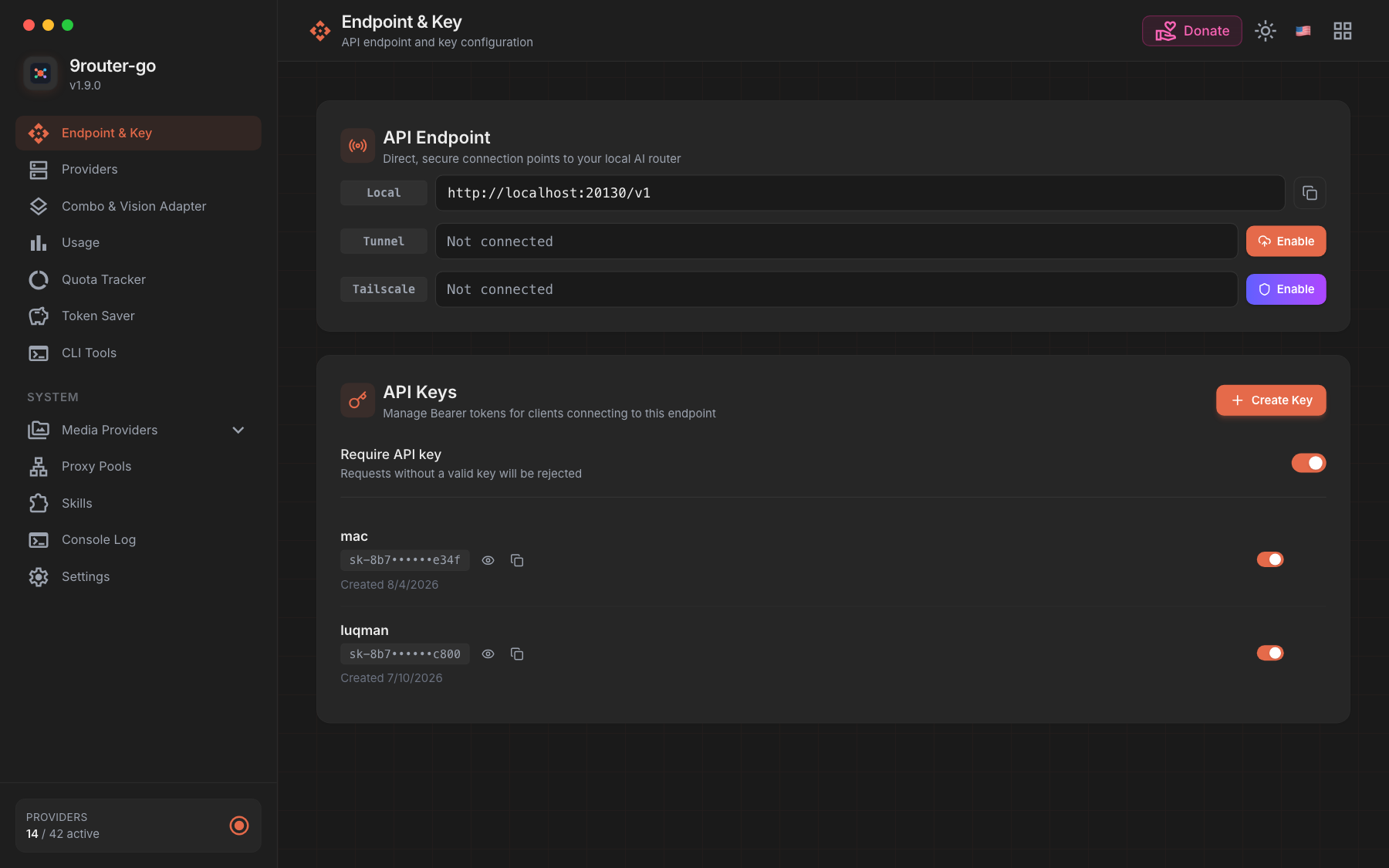
  Endpoint: http://localhost:20130/v1
  API Key:  [Settings → API Keys in the dashboard]
  Model:    kr/claude-sonnet-4.5
That's it! Start coding with FREE AI models.
Alternatives:
# Docker — no build needed
docker run -d --name 9router-go --restart unless-stopped \
  -p 20130:20130 -v "$HOME/.9router:/data" \
  -e PORT=20130 -e DATA_DIR=/data \
  -e INITIAL_PASSWORD=your-secure-password \
  luqmenul/9router-go:latest

# Manual download — pick your file, no command line guesswork:
# Windows → .exe | Mac M1+ → darwin-arm64 | Mac Intel → darwin-amd64
# Linux VPS → linux-amd64 | Raspberry Pi → linux-arm64
📦 All release binaries • 🔨 Build from source
💡 Key Features
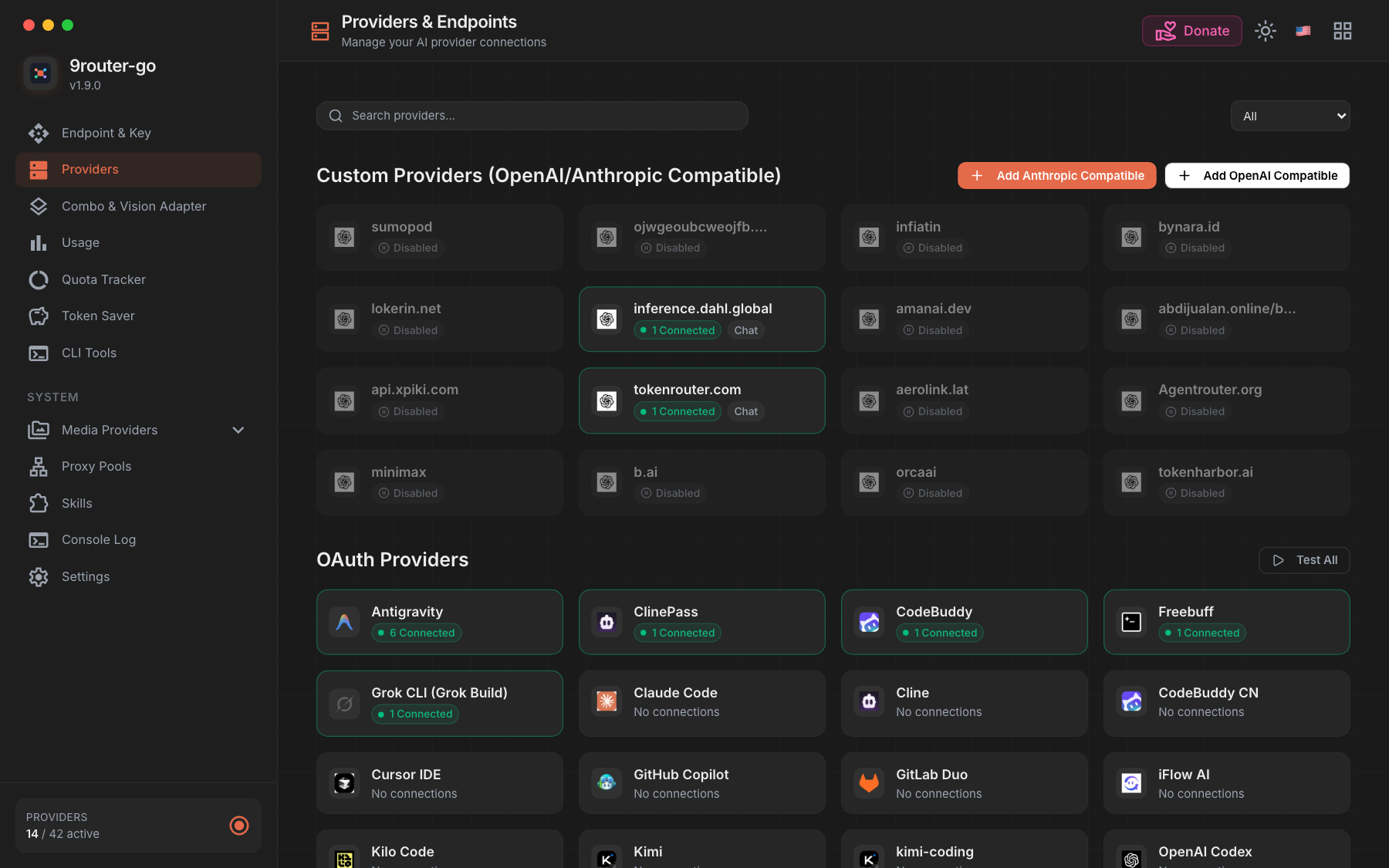
- 🖥️ Native Svelte 5 dashboard: providers, OAuth, combos, proxy pools, API keys, usage, quota, settings
- 🔌 OpenAI Chat, Claude Messages, Gemini, Ollama-compatible, Responses, embeddings, media, search, web tools
- 🔁 Combos with fallback, round-robin, sticky routing, fusion, capability-aware reordering
- 👥 Per-provider executors, OAuth refresh, reactive 401 retry
- 📡 Live usage + console-log SSE streams, stall detection
- 💾 SQLite WAL persistence, outbound proxy support, self-update, MITM commands, Docker, cross-compilation
🔄 Sharing a database with 9Router
Already running 9Router (the Next.js version)? 9router-go reads that exact database. There is no import, no export, and no migration step.
Both projects default to the same file and speak the same schema:
| Path | |
|---|---|
| macOS / Linux | ~/.9router/db/data.sqlite |
| Windows | %APPDATA%\9router\db\data.sqlite |
| Docker | /data/db/data.sqlite inside the container |
Stop 9Router, start 9router-go, and log in with your existing password. Your provider connections, proxy pools, combos, API keys, model aliases, and usage history are all there — 9router-go's own dashboard renders them, because it is the same data.
You don't even have to stop 9Router if you want to keep the Node.js dashboard around. Run 9router-go on a different port against the same DATA_DIR:
# 9Router on :20128 (Next.js)  ·  9router-go on :20130 (Go, same DB)
PORT=20130 DATA_DIR=/home/you/.9router ./9router-go
Both read the same tables, so a connection you add in either dashboard shows up in the other. SQLite serialises the writes; the supported setup is one active writer, so avoid editing the same combo or settings entry in both at the same moment.
Running it the other way round (9router-go first, then pointing 9Router at the same directory) works the same way. 9router-go will have added two columns to providerConnections (lastUsedAt, consecutiveUseCount) and one extra table (upstream_leases). Upstream ignores both — its schema sync is additive and doesn't drop unknown columns — so nothing breaks.
What 9router-go will not do:
- Import a legacy JSON export. If your 9Router data still lives in old JSON files, start upstream once to convert them, then switch.
- Run destructive migrations or pre-migration backups. Its bootstrap only ever adds — create missing tables, add missing columns, seed missing rows. It never drops or retypes.
- Interpret
_meta.schemaVersion. It's upstream's migration bookkeeping. A database written by a much newer 9Router release should be checked before you rely on it.
Take a backup first if the database matters:
cp -r ~/.9router/db ~/9router-db-backup # stop the daemon first — see DATABASE.md
Full schema, operator contract, and multi-process limits: DATABASE.md. Routing internals: ARCHITECTURE.md.
📸 Screenshots
⚙️ Setup Guide
Release binary
Download from GitHub Releases, verify against SHA256SUMS.txt.
🧪 Experimental builds
Unreleased work also ships as experimental builds. They are published separately and are never offered to a normal install:
- GitHub Releases marks them Pre-release, so
releases/latest— the URL9router-go updatefalls back to — keeps pointing at the stable version. - Docker Hub tags them
exp(luqmenul/9router-go:exp), neverlatest.
docker pull luqmenul/9router-go:exp
Opt in only if you want to help shake out bugs. 9router-go update will not
install one over a stable release — grab the asset for your platform from the
pre-releases page and
replace the running binary with it.
Build from source
Prerequisites: Go 1.27 and Bun 1.x (dashboard is embedded into the binary, so build web first):
git clone https://github.com/luqman-v1/9router-go.git
cd 9router-go
make web-build   # bun install --frozen-lockfile && bun run build
make build       # embeds VERSION into the Go binary
Run
Defaults are enough for most people — plain 9router-go listens on port 20130 with data in ~/.9router:
9router-go
curl http://localhost:20130/health
./9router-go version
Only override when you need something different (PORT, DATA_DIR/DB_PATH — there are no --port flags):
PORT=20129 ./9router-go                        # different port
DATA_DIR=/srv/9router ./9router-go              # different data dir
DB_PATH=/srv/9router/data.sqlite ./9router-go   # explicit SQLite file
HOST=127.0.0.1 ./9router-go                     # localhost only, behind a reverse proxy
🔑 Dashboard Login & Fresh Install
- Localhost (
localhost/127.0.0.1): First login uses the default compatibility password123456. Once logged in, change your password in Settings → Profile. - Remote / VPS / Docker / LAN: For security (preventing public takeover of fresh installs with known defaults, CVE-2026-56679), remote access blocks the default
123456password. You must either:- Set
INITIAL_PASSWORDon launch (Recommended):INITIAL_PASSWORD="your-secure-password" ./9router-go # Or in your .env file: # INITIAL_PASSWORD=your-secure-password - Or access via SSH port-forwarding first:
ssh -L 20130:127.0.0.1:20130 user@remote-host
# Open http://localhost:20130, login with 123456, then change password in Settings
- Set
Client example
curl http://localhost:20130/v1/chat/completions \
  -H 'Content-Type: application/json' \
  -H 'Authorization: Bearer sk-your-api-key' \
  -d '{"model":"ag/gemini-3.8-flash-high","messages":[{"role":"user","content":"Hello"}],"stream":true}'
For Claude Messages clients: ANTHROPIC_BASE_URL=http://localhost:20130/v1.
Advanced: environment variables, API surface, auth, database
Environment
| Variable | Default | Purpose |
|---|---|---|
PORT |
20130 |
HTTP port |
HOST / BIND_ADDR |
all interfaces | Listener address |
DATA_DIR |
~/.9router (%APPDATA%/9router on Windows) |
Data root |
DB_PATH |
$DATA_DIR/db/data.sqlite |
SQLite file |
INITIAL_PASSWORD |
unset (fallback 123456 locally) |
First dashboard password |
RTK_ENABLED |
true |
RTK input compression |
CAVEMAN_ENABLED / PONYTAIL_ENABLED |
false |
Style savers |
AUTO_UPDATE |
false |
Background self-update |
HTTP_PROXY / HTTPS_PROXY |
Go defaults | Upstream egress proxy |
PPROF_ENABLED |
false |
Expose /debug/pprof/* (keep off on untrusted networks) |
TRUST_PROXY / TRUST_CLOUDFLARE |
unset | Trust forwarded client-IP headers |
.env.example documents the security-sensitive subset and OAuth overrides.
API surface
POST /v1/chat/completions       OpenAI Chat Completions
POST /v1/messages               Claude Messages
POST /v1/responses              Responses API
POST /v1/embeddings             Embeddings
POST /api/chat                  Ollama-compatible chat
GET  /v1/models                 Model catalog
POST /v1/images/generations     Image generation
POST /v1/videos/generations     Video generation
POST /v1/audio/speech           Text to speech
POST /v1/audio/transcriptions   Speech to text
POST /v1/search                 Web search
GET  /api/usage/stream          Live usage SSE
GET  /health                    Liveness
GET  /api/version               Version metadata
Authentication
- Public:
/health, dashboard HTML/assets,/login, OAuth callbacks. - Proxy routes need an active client API key (
Authorization: Bearer/X-API-Key). - Dashboard APIs need a session cookie, CLI token, or API key; destructive ops (shutdown, update, DB import) need a session or CLI token.
- The API server defaults to all interfaces — bind localhost or protect the port outside trusted machines.
Database compatibility
Go reads/writes the upstream 9router table/JSON shapes and bootstraps the core schema on startup (creates the 11 tables when absent, backfills missing columns, seeds an empty settings row) — a fresh DATA_DIR just works, no upstream install needed. Existing databases are never modified beyond additive backfills. Full contract in DATABASE.md, routing internals in ARCHITECTURE.md.
🤝 Contributing
Issues and pull requests use templates, so pick the right one rather than opening a blank report:
- Bug report — something behaves incorrectly. Include a reproduction,
9router-go version, OS, and the log excerpt around the failure. - Feature request — the problem you cannot solve today, the surface it touches, and whether upstream already has it.
- Upstream parity — a behaviour
decolua/9routerhas and this gateway does not; link the upstream commit or PR. - Question — configuration and usage help.
PRs follow the checks CI runs: go vet ./..., go test -count=1 ./..., make test-integration, plus cd web && bun test and make vet-svelte for anything touching the dashboard. Before writing code, skim AGENTS.md — provider isolation and the Go/Svelte conventions there are enforced by review.
📚 Docs
ARCHITECTURE.md— routing, providers, runtime layoutDATABASE.md— SQLite schema & operator contractROADMAP.md— proposals only, not current behaviorCHANGELOG.md— release history (Go v1.9.9, upstream baselinedecolua/9routerv0.5.85). Work merged since the last tag lives in.changes/and is folded in at the next release; the dashboard's changelog modal shows both.docs/TELEGRAM_RELEASE_NOTIFICATIONS.md— one-time setup for the release notice posted to Telegram
Credits
- 9Router — original Next.js gateway & dashboard this Go port preserves compatibility with
📄 License
MIT License — lihat LICENSE.